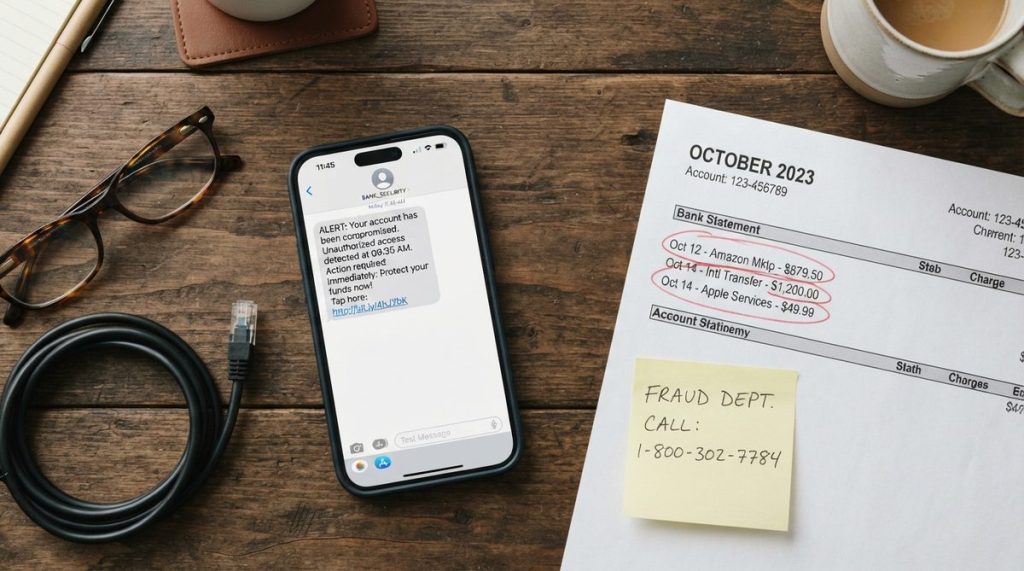


The Phone Call That Almost Cost Margaret $47,000
Margaret Chen, a 72-year-old retired schoolteacher in Scottsdale, Arizona, had always considered herself sharp. She did the New York Times crossword every morning, managed her own investment portfolio, and had been using email since the mid-1990s. So when she received what appeared to be a security alert from her bank last October, she didn’t panic — she responded methodically, the way she’d handled everything in life.
The email looked perfectly legitimate. It carried her bank’s logo, used professional language, and warned that her account had been compromised. It included a phone number to call immediately. When Margaret dialed, a calm, professional-sounding man walked her through a “verification process” that included confirming her account number and Social Security digits.
It wasn’t until her actual bank called two days later — confused by a wire transfer request for $47,000 — that Margaret realized what had happened. She’d been phished. The email was fake. The phone number routed to a criminal operation. And the “verification process” had handed over every piece of information the scammers needed.
In my 14 years working in cybersecurity and digital privacy research, I’ve heard hundreds of stories like Margaret’s. What strikes me every single time isn’t that the victims were careless or unintelligent. It’s the opposite. These are accomplished, thoughtful people who encountered criminals using increasingly sophisticated tactics designed to bypass exactly the kind of rational thinking that served them well everywhere else in life.
Margaret was lucky — her bank flagged the transfer before it cleared. But millions of older Americans aren’t as fortunate. And the scale of this problem is staggering.
The Billion-Dollar Crisis Hiding in Plain Sight
According to the FBI’s Internet Crime Complaint Center, Americans over 60 lost more than $3.4 billion to online fraud in 2023 alone — a 11% increase from the previous year. The Federal Trade Commission reports that while younger adults actually report fraud more frequently, older adults lose significantly more money per incident. The median loss for someone over 70 is nearly four times higher than for someone in their 20s.
And those are only the reported cases. Researchers estimate that fewer than 1 in 5 victims ever file a complaint, meaning actual losses could exceed $15 billion annually. Many victims stay silent out of embarrassment, fear of losing financial independence, or simply not realizing they’ve been scammed until it’s too late.
What I see most often in my work is a dangerous knowledge gap. Older adults are adopting technology at record rates — AARP’s 2024 Tech Trends report found that 76% of adults over 50 now own a smartphone, and 44% use smart home devices. But cybersecurity education hasn’t kept pace with that adoption. People are using powerful digital tools without understanding the specific threats those tools attract.
This article is my attempt to close that gap. Not with scare tactics, but with the same practical, specific guidance I give to my own family members.

The Five Most Dangerous Online Scams Targeting Older Adults in 2025
Scammers aren’t static. They evolve constantly, testing new approaches and refining what works. But as of mid-2025, these five categories account for the vast majority of financial losses among Americans over 50.
1. Impersonation Scams (Government and Tech Support)
This is what hit Margaret. Someone pretends to be from the IRS, Social Security Administration, Medicare, your bank, or a tech company like Microsoft or Apple. They create urgency — your account is frozen, your Social Security number has been “suspended,” your computer has a virus — and push you toward immediate action.
The FTC documented over 330,000 impersonation scam reports in 2023, with losses exceeding $1.1 billion. The most dangerous evolution: scammers now use AI-generated voices that can mimic real people, including family members who sound like they’re calling from jail or a hospital.
2. Investment and Cryptocurrency Fraud
These scams typically start with a social media ad, a dating app conversation, or even a “wrong number” text that leads to a friendly exchange. Over weeks or months, the scammer builds trust and then introduces a “guaranteed” investment opportunity, often involving cryptocurrency.
The FBI calls this “pig butchering” — the victim is slowly fattened with small, seemingly real returns before the scammer drains everything. In 2023, investment fraud was the single highest-loss category for older adults at $1.2 billion.
3. Romance Scams
Loneliness is a vulnerability that criminals exploit ruthlessly. Romance scammers create compelling fake profiles on dating sites and social media, invest weeks building emotional intimacy, and then manufacture a crisis — a medical emergency, a travel problem, a business deal gone wrong — that requires money.
The median loss in romance scams for adults over 60 is approximately $9,000, but I’ve consulted on cases exceeding $500,000. These are particularly devastating because victims lose both money and an emotional relationship they believed was real.
4. Phishing Emails and Smishing Texts
That “Your package couldn’t be delivered” text from USPS? The “Confirm your Amazon purchase” email? The “Your Netflix payment failed” notification? These are mass-produced lures designed to get you to click a link and enter personal information on a fake website that looks identical to the real one.
In my research, I’ve analyzed phishing emails that are virtually indistinguishable from legitimate corporate communications. The criminals purchase real company templates, replicate formatting pixel by pixel, and register domain names that are one character off from the real URL.
5. Grandparent and Family Emergency Scams
A panicked voice calls: “Grandma, I’m in trouble. Please don’t tell Mom and Dad.” The caller claims to be a grandchild who’s been arrested, in an accident, or stranded abroad. They need bail money, medical payment, or a plane ticket — sent immediately via gift cards or wire transfer.
With AI voice cloning, scammers can now replicate a family member’s voice using just a few seconds of audio scraped from social media videos. This makes an already emotionally manipulative scam dramatically more convincing.
| Scam Type | How It Starts | Median Loss (Age 60+) | Payment Method Used | Red Flag to Watch For |
|---|---|---|---|---|
| Impersonation (Gov/Tech) | Phone call, email, or pop-up | $4,000–$8,000 | Wire transfer, gift cards | Urgency; threats of arrest or account closure |
| Investment/Crypto Fraud | Social media, text, dating app | $10,000–$50,000+ | Cryptocurrency, wire transfer | “Guaranteed” returns; pressure to invest quickly |
| Romance Scams | Dating sites, Facebook, Instagram | $9,000 | Wire transfer, gift cards, crypto | Person avoids video calls; asks for money |
| Phishing/Smishing | Email or text message | $500–$3,000 | Stolen credentials/account access | Unexpected message with link; misspelled URL |
| Grandparent/Emergency | Phone call (often AI-cloned voice) | $5,000–$15,000 | Gift cards, wire transfer, cash | “Don’t tell anyone”; demands immediate payment |
Why Older Adults Are Disproportionately Targeted
I want to be direct about something: being targeted by scammers is not a reflection of intelligence or competence. Criminals target older adults for strategic reasons that have nothing to do with cognitive ability.
Financial stability. Adults over 60 hold approximately 53% of all household wealth in the United States. They’re more likely to have savings, home equity, and retirement accounts — bigger potential payouts for criminals.
Generational trust patterns. Many people who grew up before the internet era developed social norms around politeness, helpfulness, and trusting institutions. Scammers exploit these admirable qualities. When someone claiming to be from the Social Security Administration calls, the instinct to cooperate is strong.
Technology adoption without security training. As I mentioned earlier, tech adoption among older adults has surged. But most devices arrive without meaningful security guidance. If you’re interested in how technology can actually support safer, more independent living when used properly, our guide to 7 tech devices that help older adults age in place safely covers that side of the equation.
Isolation. Adults who live alone or have limited social interaction are more vulnerable because they have fewer people to consult before making decisions — and scammers deliberately tell victims not to discuss the situation with anyone.
Your 10-Step Action Plan to Protect Yourself Online
I often tell my clients that cybersecurity isn’t about becoming a tech expert. It’s about building a handful of habits that make you a dramatically harder target. Here are the ten steps I recommend to every person over 50 — and that I’ve helped my own parents implement.
- Adopt a 24-hour rule for any unexpected financial request. No legitimate organization — not your bank, not the IRS, not Medicare — will demand immediate action. If someone creates urgency, that itself is the warning sign. Tell them you’ll call back, then contact the organization using the phone number on your statement or their official website.
- Enable two-factor authentication (2FA) on every account that offers it. This means that even if a scammer steals your password, they can’t access your account without a second verification code sent to your phone. Start with your email and bank accounts. Your bank’s website will have step-by-step instructions, or call their customer service line and ask them to walk you through it.
- Use a password manager. Stop reusing passwords. A password manager like 1Password ($36/year) or Bitwarden (free) creates and stores unique, strong passwords for every account. You only need to remember one master password. This single change eliminates one of the most common ways accounts get compromised.
- Verify before you click. If you receive an email or text claiming to be from a company, don’t click the link in the message. Instead, open your browser, type the company’s web address directly, and log in from there. If there’s a real problem with your account, you’ll see it when you log in.
- Set up a family code word. Choose a secret word or phrase that only your immediate family knows. If someone calls claiming to be a grandchild or relative in distress, ask for the code word. AI can clone voices, but it can’t guess your family’s secret phrase.
- Freeze your credit at all three bureaus. This prevents anyone from opening new accounts in your name. It’s free, takes about 10 minutes per bureau (Equifax, Experian, TransUnion), and you can temporarily lift the freeze when you legitimately need credit. CISA recommends this as one of the single most effective identity theft prevention measures.
- Keep your devices updated. Those software update notifications aren’t optional annoyances — they’re security patches. Set your smartphone, tablet, and computer to update automatically. Outdated software is one of the easiest entry points for malware.
- Be skeptical of unsolicited contact. If you didn’t initiate the conversation — whether it’s a phone call, email, text, or social media message — treat it with healthy suspicion. Legitimate organizations don’t cold-call you to ask for personal information.
- Review your financial statements weekly. Don’t wait for monthly statements. Log into your bank and credit card accounts at least once a week and look for unfamiliar charges. The sooner you catch unauthorized activity, the easier it is to reverse. If you’re also looking at ways to safeguard your retirement finances more broadly, our piece on retirement inflation protection strategies covers the bigger picture.
- Talk about it openly. Scammers thrive on silence and shame. Discuss these threats with friends, family, and neighbors. If you encounter a scam attempt — even if you didn’t fall for it — tell someone. You might protect them from the same trick.

What to Do If You’ve Already Been Scammed
If you suspect you’ve been a victim, speed matters. Here’s what to do immediately:
Contact your bank or credit card company. Call the number on the back of your card or on your statement — not any number a scammer gave you. Many financial institutions have fraud departments available 24/7 and can freeze transactions that haven’t yet processed.
File a report with the FTC at consumer.ftc.gov or by calling 1-877-382-4357. This creates an official record and helps law enforcement track scam networks.
Report to the FBI’s IC3. The Internet Crime Complaint Center (ic3.gov) handles online fraud specifically and has a dedicated team focused on elder fraud cases. In 2024, their Recovery Asset Team successfully froze over $500 million in fraudulent transactions.
Change your passwords immediately. If you entered login credentials on a suspicious site, change those passwords — and any other accounts where you used the same password — right away.
Place a fraud alert on your credit reports. Call any one of the three credit bureaus, and they’re required to notify the other two. A fraud alert lasts one year and requires businesses to verify your identity before opening new accounts.
Don’t let embarrassment stop you from taking action. In my experience, the people who recover most successfully are those who act quickly and aren’t afraid to ask for help.
The Technology That Actually Keeps You Safer
Here’s something I find ironic in the best possible way: the same technology that scammers exploit can also be your strongest defense. The key is knowing which tools to trust.
Built-In Phone Protections
Both iPhone and Android devices now include spam call filtering. On iPhone, go to Settings → Phone → Silence Unknown Callers. On Android, open the Phone app → Settings → Caller ID & Spam. These features won’t block every scam call, but they significantly reduce the volume.
Email Filtering
Gmail, Outlook, and Yahoo all have built-in phishing detection that’s become remarkably sophisticated. Make sure your spam filter is enabled, and if a suspicious email does reach your inbox, use the “Report phishing” option rather than just deleting it. This trains the filter to catch similar messages.
Browser Safety Features
Google Chrome, Firefox, and Safari all include warnings when you’re about to visit a known malicious website. Keep your browser updated and don’t ignore these warnings. If your browser tells you a site is dangerous, close the tab immediately.
Banking Apps
Most major banks now offer real-time transaction alerts via their mobile apps. Enable these notifications so you receive an instant ping whenever money moves in or out of your account. If you see a transaction you didn’t authorize, you can respond in minutes instead of days.
If you’re exploring how technology can support your broader goals around independent living and well-being, you might also appreciate our resource on setting up your home to age in place for under $1,500, which includes some smart home safety tech recommendations.
Building a Digital Safety Net With Your Family
One of the most effective defenses against online scams targeting older adults isn’t software — it’s communication. I encourage every family to have what I call a “digital safety conversation” at least twice a year.
This isn’t about adult children taking over their parents’ finances or questioning their competence. It’s about establishing a mutual support system. Younger family members are targeted by scams too — just different ones.
Here’s what that conversation should cover:
- Share the family code word and update it annually
- Review which accounts have two-factor authentication enabled
- Discuss any suspicious contacts anyone in the family has received
- Make sure everyone knows who to call first if something seems wrong
- Consider designating a “trusted contact” at your brokerage firm — someone the firm can reach out to if they suspect financial exploitation on your account (most major brokerages now offer this option under FINRA Rule 2165)
Margaret Chen, the retired teacher from the beginning of this article, now leads a monthly “Scam Watch” discussion group at her local library. She shares the latest fraud techniques she’s learned about and walks attendees through protective measures. When I spoke with her recently, she told me something that stayed with me: “I used to be embarrassed that I almost fell for it. Now I realize that sharing my story might be the most useful thing I’ve done since I stopped teaching.”
Staying Connected Without Staying Vulnerable
I want to end with something I feel strongly about: the answer to online scams is never to stop using technology. The benefits of staying digitally connected — reduced isolation, better access to healthcare information, easier communication with family, cognitive engagement — far outweigh the risks when you take reasonable precautions.
A 2024 study published in the Journal of the American Geriatrics Society found that regular internet use among adults over 65 was associated with a 20-28% lower risk of dementia over an eight-year follow-up period. Technology isn’t the enemy. Uninformed technology use is.
The scammers are counting on you being too intimidated, too embarrassed, or too overwhelmed to fight back. Prove them wrong. Implement even three or four of the steps in this article, and you’ve made yourself a significantly harder target.
And if you ever get a call from someone claiming your grandson is in jail, your Social Security number has been suspended, or your computer has a virus — take a breath, hang up, and call someone you trust. That single pause is worth more than any antivirus software money can buy.
About Dr. Priya Sharma, PhD in Computer Science, CISSP
Dr. Priya Sharma is a cybersecurity expert with a PhD in Computer Science and a Certified Information Systems Security Professional (CISSP) credential. She has spent 14 years researching digital privacy, online fraud, and data protection — with a particular focus on the risks facing older internet users. At Daily Trends Now, Dr. Sharma writes about online scams, password security, smartphone privacy, and the practical steps readers can take to stay safe in an increasingly connected world.