
Key Takeaways
- AI tools like voice assistants, medication reminders, and fall detection can help older adults live more independently at home.
- Understanding basic AI privacy settings is essential to protect personal data and avoid scams powered by artificial intelligence.
- Not all AI products are created equal—comparing features, costs, and ease of use prevents expensive mistakes.
- A simple step-by-step approach to setting up AI devices can make the technology far less intimidating.
A Morning That Runs on Its Own
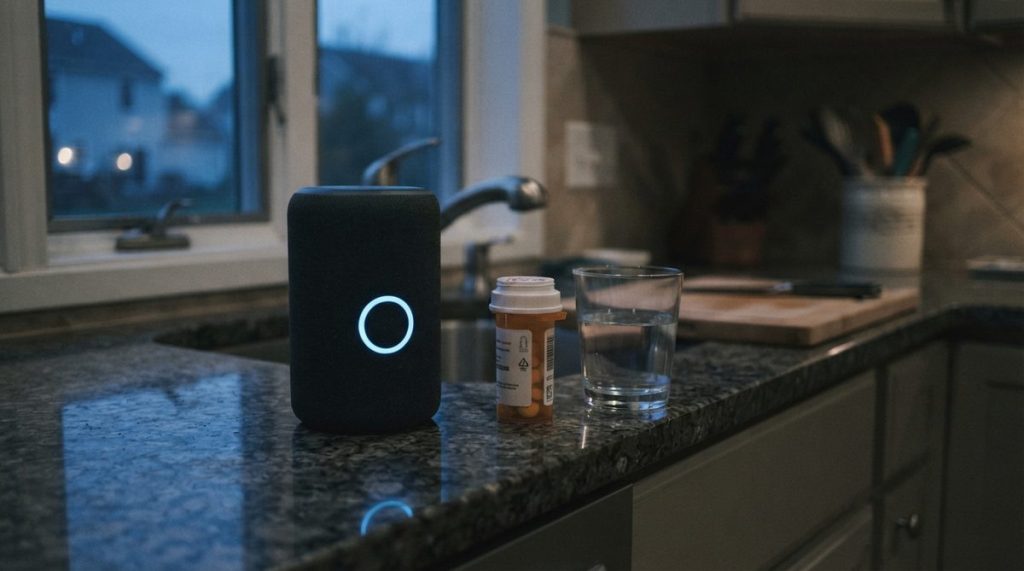
Imagine you’re 72, living alone in the same three-bedroom house where you raised your kids. You wake up at 6:45 a.m. and say, “Good morning,” to a small speaker on the nightstand. It responds by reading the weather forecast, reminding you to take your blood-pressure medication, and confirming that your grocery delivery is arriving between 10 and noon. You didn’t open a single app or tap a single screen.
That scenario is not science fiction, and it does not require an engineering degree. It is a Tuesday morning powered by artificial intelligence—the same category of technology that is quietly reshaping how millions of Americans over 50 manage health, safety, communication, and daily routines. The question is no longer whether AI for older adults is useful. The question is how to use it wisely, affordably, and safely.
This article walks through exactly that. It covers what AI actually does in plain language, which devices deliver real value, what risks to watch for, and how to set everything up without calling your grandkids for help (although they’re welcome to visit anyway).
What AI Actually Means—Without the Jargon
Artificial intelligence, at its simplest, is software that learns patterns and makes decisions based on data. When a voice assistant understands “Turn on the hallway light,” it is using AI to convert your spoken words into a command. When a smartwatch detects an irregular heartbeat, AI is analyzing sensor data and comparing it to known cardiac patterns.
You do not need to understand how the algorithms work any more than you need to understand how a carburetor works to drive a car. What matters is knowing which AI-powered tools exist, what they can and cannot do, and where the privacy boundaries are.
Three Categories of AI Most Relevant to Daily Life
- Voice assistants — Amazon Alexa, Google Assistant, Apple Siri. These respond to spoken commands for reminders, calls, music, smart-home controls, and information.
- Health and safety monitoring — Wearables and home sensors that track heart rate, detect falls, monitor sleep, and alert caregivers or emergency services.
- Communication and cognitive tools — AI-powered apps that transcribe phone calls for hearing-impaired users, translate languages in real time, or provide brain-training exercises adapted to individual ability.
Real Benefits: Where AI Delivers Genuine Value
According to AARP’s technology resources, adults 50 and older are adopting smart-home technology at increasing rates, with voice assistants ranking among the most popular entry points. The appeal is straightforward: hands-free operation removes barriers for people with arthritis, low vision, or limited mobility.
Medication Management
Consider a retiree managing five prescriptions with different schedules. A smart speaker can be programmed to announce each medication by name at the correct time, every single day, without fail. Some systems even log whether the reminder was acknowledged, giving a distant family member peace of mind.
Dedicated pill-dispensing devices like the Hero or MedMinder go further. They lock medications inside a cartridge and dispense the correct dose on schedule, sending alerts to a caregiver’s phone if a dose is missed. AI handles the sorting; the user simply takes what appears.
Fall Detection and Emergency Response
Falls are the leading cause of injury-related death among Americans 65 and older, according to CDC data. AI-powered fall detection is now embedded in mainstream consumer devices—the Apple Watch Series 9 and newer, the Google Pixel Watch 3, and several Samsung Galaxy Watch models. When the accelerometer and gyroscope detect a hard fall followed by immobility, the device automatically calls emergency services and shares the user’s GPS location.
Home-based radar sensors from companies like Vayyar (used in the CareAlert system) can detect falls in a bathroom without a wearable, addressing the common problem of someone removing a watch before a shower—precisely when wet-floor falls happen most.
Combating Social Isolation
Social isolation is linked to a 50 percent increased risk of dementia, according to the National Academies of Sciences. AI video-calling devices like the Amazon Echo Show or Google Nest Hub Max allow older adults to connect with family through a simple voice command—”Call Sarah”—without navigating menus. AI-assisted captioning on these devices also helps users with hearing loss follow conversations in real time.
For those exploring options to remain in their homes long-term, these connected technologies are a critical piece of the puzzle. Our guide on aging in place decade by decade details how needs shift over time and where technology fits at each stage.

Comparing Popular AI Devices for Older Adults
Not every device suits every user. The table below compares five widely available AI-powered products across the features that matter most: ease of setup, monthly cost, voice control, health monitoring, and fall detection.
| Device | Primary Use | Voice Control | Health Monitoring | Fall Detection | Approx. Cost |
|---|---|---|---|---|---|
| Amazon Echo Show 8 (3rd Gen) | Voice assistant, video calls, smart home | Yes (Alexa) | No | No | $150 (no monthly fee) |
| Apple Watch Series 10 | Health tracking, emergency SOS | Yes (Siri) | Heart rate, blood oxygen, ECG | Yes | $399+ (cellular plan ~$10/mo) |
| Google Nest Hub Max | Video calls, smart home, reminders | Yes (Google Assistant) | Sleep tracking (via Nest Aware) | No | $230 (optional $8/mo Nest Aware) |
| Medical Guardian Mini | Personal emergency response | Limited (button + speak) | No | Yes (AI-powered) | $37–$45/month |
| Samsung Galaxy Watch 7 | Health tracking, emergency SOS | Yes (Bixby / Google Assistant) | Heart rate, blood pressure (select markets), sleep | Yes | $300+ (cellular plan ~$10/mo) |
Review sites like Consumer Reports regularly test and update rankings for smart speakers, wearables, and medical alert systems, and those independent evaluations are worth checking before committing to any purchase.
The Risks: What to Watch For
AI is a tool, not a miracle. Using it carelessly introduces real risks—particularly around privacy, over-reliance, and the newest breed of AI-powered scams.
Privacy and Data Collection
Voice assistants are always listening for a “wake word,” and recordings of your commands are stored on company servers unless you change the default settings. Amazon, Google, and Apple all allow users to delete voice history and opt out of human review of recordings, but the settings are buried in app menus that most people never open.
A clear privacy step everyone should take: open the companion app for your voice assistant (Alexa app, Google Home app, or Apple Settings), navigate to Privacy, and disable the option that allows recordings to be used to “improve services.” This prevents human reviewers from listening to clips of your voice.
AI-Powered Scams
Artificial intelligence has supercharged fraud. Voice-cloning technology can now replicate a family member’s voice from just a few seconds of audio pulled from social media. The FBI reported that Americans over 60 lost more than $3.4 billion to fraud in 2023, and AI is making scams harder to detect.
If you receive an urgent phone call that sounds like a grandchild in distress, hang up and call that person back on their known number. We covered this threat in depth in our article on financial scams targeting older adults online, including specific red flags and reporting steps.
Compulsive Use and Mental Health
A 2024 study published in the journal Aging & Mental Health found a statistically significant link between compulsive smartphone use and increased depression risk in older adults. AI-driven features—infinite scroll feeds, auto-play videos, personalized notifications—are specifically designed to keep users engaged longer. Setting firm daily screen-time limits using built-in tools (Screen Time on iPhone, Digital Wellbeing on Android) is a practical countermeasure.

Step-by-Step: Setting Up Your First AI Device Safely
Whether you are unboxing a smart speaker or configuring a new smartwatch, the following steps create a secure foundation. This process applies to virtually any AI-powered consumer device.
- Update the device immediately. As soon as it powers on and connects to Wi-Fi, check for software updates in Settings. Updates patch security vulnerabilities that scammers exploit. CISA (the Cybersecurity and Infrastructure Security Agency) consistently lists outdated software as one of the top risks for home devices.
- Create a strong, unique password for the associated account. Use at least 12 characters mixing uppercase letters, lowercase letters, numbers, and symbols. Do not reuse a password from another account.
- Enable two-factor authentication (2FA). This sends a one-time code to your phone or email whenever someone tries to log in. Amazon, Google, and Apple all support 2FA—turn it on in account security settings.
- Review and tighten privacy settings. Disable voice-recording storage, opt out of data-sharing for product improvement, and turn off any purchase-by-voice feature unless you specifically want it.
- Set up emergency contacts. For wearables with fall detection or medical alert features, enter at least two emergency contacts and verify the device can reach them with a test call.
- Establish a routine check. Once a month, open the companion app, check for updates again, review what data has been collected, and delete anything you are not comfortable keeping.
These six steps typically take under 30 minutes and dramatically reduce the likelihood of a privacy breach or security incident.
Choosing the Right AI Tools for Your Situation
The best AI device depends entirely on what problem you are trying to solve. Buying a $400 smartwatch when the real need is a hands-free way to call family is an expensive mismatch.
If the Goal Is Independence at Home
A voice assistant paired with smart plugs, a smart thermostat, and a video doorbell covers most needs: controlling lights and temperature by voice, seeing who is at the door without getting up, setting cooking timers, and receiving medication reminders. Total startup cost can be under $250.
If the Goal Is Health Monitoring
A smartwatch with continuous heart-rate tracking, fall detection, and emergency SOS provides a portable safety net. For individuals with specific conditions like atrial fibrillation, the Apple Watch’s FDA-cleared ECG feature or the Samsung Galaxy Watch’s blood-pressure monitoring (available in select markets with proper calibration) offers clinically relevant data that can be shared directly with a physician.
If the Goal Is Staying Connected with Family
A smart display (Echo Show, Nest Hub Max, or Facebook Portal) sits on a counter and enables video calls with a voice command. Some families set up “Drop In” features that allow a child or grandchild to check in—essentially an intercom—with the older adult’s explicit permission. This is especially useful for adults who find small phone screens difficult to navigate.
These technology investments also interact with financial planning. Connected health devices may reduce the need for paid in-home assistance, stretching retirement budgets further. For context on how purchasing power evolves over time, see our analysis of inflation and retirement savings.
Common Mistakes to Avoid
Even well-intentioned technology adoption can go sideways. Here are pitfalls that come up repeatedly in consumer complaints and support forums.
Buying Without a Trial Period
Major retailers like Amazon, Best Buy, and Costco offer return windows of 15 to 90 days on electronics. Use that window aggressively. Set up the device on day one, live with it for a week, and return it if the interface frustrates you. A frustrating device becomes an expensive paperweight.
Skipping the User Guide
Modern devices include quick-start cards that look deceptively simple. The full user guide—usually available as a PDF on the manufacturer’s website—contains accessibility settings (larger text, high-contrast mode, slower speech rate for voice assistants) that can make or break the experience for someone with vision or hearing challenges.
Giving AI Devices Access to Financial Accounts
Some voice assistants allow you to link a bank account or credit card for voice-activated purchases. This is convenient but risky, especially in a household where anyone within earshot can trigger a purchase. Disable voice purchasing or protect it with a spoken PIN code at minimum.
Assuming AI Advice Is Medical Advice
AI chatbots like ChatGPT or Google’s Gemini can answer health questions, but their responses are not reviewed by a physician and may be inaccurate or dangerously incomplete. Use AI as a starting point for research, not as a substitute for professional medical consultation.
Where AI for Older Adults Is Heading Next
The technology is evolving fast. Several developments on the near horizon are worth monitoring.
Ambient health monitoring. Companies are developing radar-based sensors that mount on a bedroom wall and passively track breathing rate, sleep quality, and room occupancy—no wearable required. These could be transformative for older adults who refuse to wear a watch or pendant.
AI-powered hearing enhancement. Apple’s AirPods Pro 2 already received FDA clearance as an over-the-counter hearing aid in 2024, using AI to customize sound amplification profiles. As this category matures, it could dramatically reduce the cost of hearing assistance, which currently averages $2,000–$7,000 per pair of traditional hearing aids.
Proactive health alerts. Future wearables may detect early signs of urinary tract infections, dehydration, or blood-sugar irregularities through advanced biosensors, alerting users and caregivers before symptoms become emergencies.
These advancements will only be useful, however, if the fundamentals are in place: updated software, strong passwords, tightened privacy settings, and a healthy skepticism toward anything that asks for money or personal information.
The Bottom Line
AI for older adults is not about keeping up with trends. It is about solving specific, everyday problems—remembering medications, detecting a fall when nobody else is home, staying connected to people who matter, and maintaining control over daily life for as long as possible.
The technology works best when you approach it the same way you would approach any tool: learn what it does, set it up correctly, understand its limits, and revisit it regularly to make sure it still serves your needs. Start with one device that addresses your most pressing concern, master it, and expand from there.
That hypothetical morning from the opening of this article—medication reminders, weather updates, a grocery delivery confirmation, all before the first cup of coffee—is available today for less than the cost of a single month of many in-home care services. The key is getting started on your own terms, at your own pace, with your eyes open.
Frequently Asked Questions
Is AI safe for older adults to use at home?
Yes, when set up with proper security measures — strong passwords, two-factor authentication, updated software, and tightened privacy settings. CISA recommends treating every connected device the same way you would treat a locked door: check it regularly and keep it updated.
What is the easiest AI device for someone over 60 to start with?
A smart speaker with a screen, such as the Amazon Echo Show 8 or Google Nest Hub Max, is widely considered the easiest entry point. Voice commands eliminate the need to navigate small screens, and video calling works with a simple spoken request.
Can AI voice assistants accidentally share my personal information?
Voice assistants store recordings of your commands by default, but Amazon, Google, and Apple all allow you to delete voice history and opt out of having recordings reviewed by employees. Review privacy settings in the companion app and disable data-sharing features you do not need.