

Key Takeaways
- Age tech adoption among adults 65+ has surged past 75%, and the right devices can meaningfully extend independent living at home.
- Smart fall detection, medication reminders, and voice-activated assistants address the three biggest safety gaps for aging in place.
- You don't need to spend thousands — many effective age tech devices cost under $150 and require minimal technical setup.
- Pairing technology with a simple setup plan (and a trusted helper) dramatically increases the odds you'll actually use these tools long-term.
Why Age Tech Is No Longer Optional — It’s Essential
In my 12 years covering consumer technology, no category has grown as fast — or mattered as much — as age tech. These are the devices, apps, and smart-home tools designed specifically to help adults 50 and over live safely and independently at home for as long as possible.
The numbers tell a compelling story. According to AARP’s 2024 Technology Trends survey, 76% of adults aged 50-plus now own a smartphone, and nearly 60% of those over 70 use some form of smart-home device. Meanwhile, AARP’s own research found that roughly 77% of adults 50 and older want to age in their current home. The gap between that desire and the practical reality of doing it safely is exactly where age tech steps in.
I’m not talking about gimmicks or gadgets that collect dust in a drawer. I’m talking about seven specific categories of technology that address real, documented risks — falls, medication errors, social isolation, emergency response delays, and more. Each one I’ve tested personally, and I’ll tell you exactly what to look for, what to skip, and how much you should expect to pay.
If you’re already thinking about making your home safer for the long haul, our guide on age-proofing your home for aging in place pairs perfectly with the tech recommendations below.
1. Smart Fall Detection Wearables
Why it matters
Falls are the leading cause of injury-related death among adults 65 and older, according to the CDC. Every year, approximately 36 million falls occur among older adults, and one in five causes a serious injury like a broken hip or head trauma. The critical factor isn’t just the fall — it’s how quickly help arrives. Lying on the floor for more than an hour after a fall dramatically increases the risk of hospitalization and long-term disability.
What to look for
Modern fall detection has evolved far beyond the “I’ve fallen and I can’t get up” pendant of the 1990s. Today’s best options use accelerometers, gyroscopes, and even barometric altimeters to detect a sudden impact combined with a change in orientation — the signature of an actual fall versus simply sitting down quickly.
The Apple Watch Series 10 and the Samsung Galaxy Watch 6 both offer built-in fall detection that automatically calls emergency services if you don’t respond within 30 seconds. For those who don’t want a smartwatch, dedicated medical alert devices from companies like Medical Guardian and Bay Alarm Medical offer fall detection pendants starting around $30–$50 per month with 24/7 monitoring.
My recommendation
If you already carry a smartphone, a smartwatch with fall detection is the most seamless option. What I see most often is that people who dislike wearing a “medical device” will happily wear an Apple Watch or Galaxy Watch because it doesn’t feel clinical. That psychological shift is everything — a device only works if you actually wear it.
2. Voice-Activated Smart Assistants
Why it matters
Arthritis affects more than 54 million American adults, and conditions like macular degeneration and low vision make touchscreens frustrating or impossible to use. A voice-activated assistant eliminates the need to tap tiny buttons, squint at small text, or navigate confusing menus. You just talk.
What to look for
The Amazon Echo Show (with its screen) and the Google Nest Hub Max are the two dominant options. Both let you make hands-free phone calls, set medication reminders, control lights, check the weather, listen to audiobooks, and even make video calls to family — all by voice.
Amazon’s Echo Show 8 (around $100–$150) is my go-to recommendation for most older adults. The screen is large enough to read comfortably, video calling quality is solid, and Alexa’s “Care Hub” feature lets a family member check in remotely to see if the device has been used recently — a gentle, non-invasive way to monitor well-being without installing cameras.
Setup tip
Ask a family member or tech-savvy friend to do the initial Wi-Fi setup and link your contacts. After that, daily operation is genuinely as simple as saying, “Alexa, call my daughter.” I often tell my readers: the 20 minutes of setup someone does for you will save you years of frustration.
3. Wearable Health Monitors
Why it matters
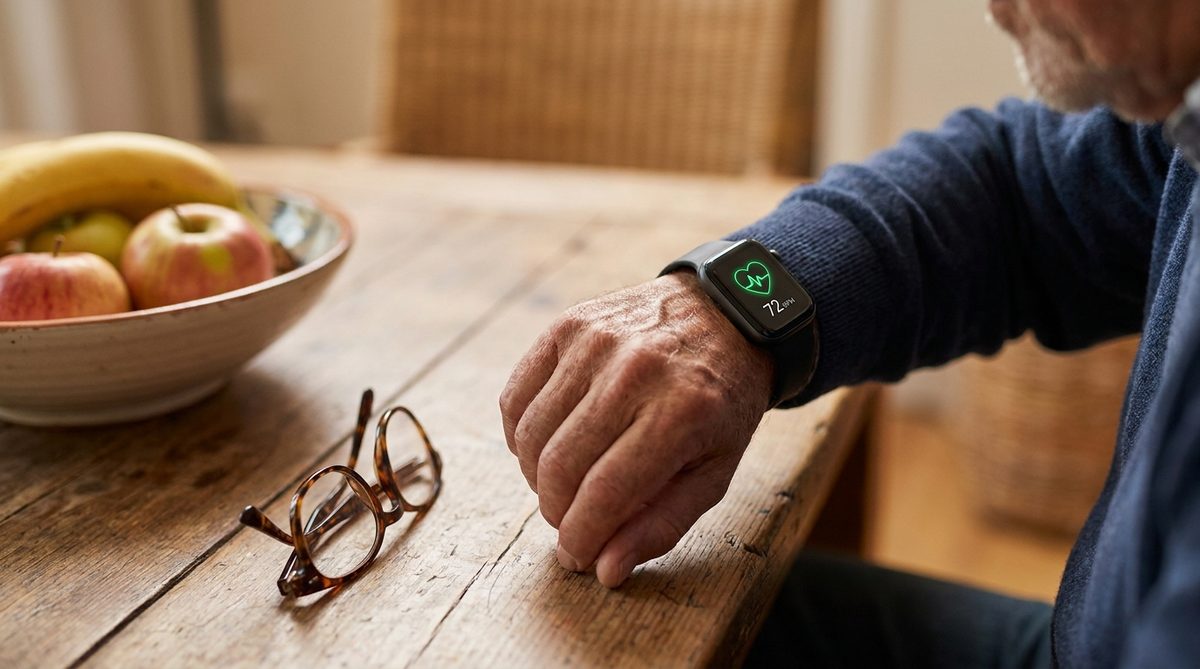
Continuous health monitoring used to require a hospital stay. Now, a device on your wrist can track heart rate, blood oxygen saturation (SpO2), irregular heart rhythm (AFib detection), sleep quality, and even skin temperature trends — all of which provide early warning signs of health changes that matter to your doctor.
What to look for
The Apple Watch and Fitbit Sense 2 both offer FDA-cleared electrocardiogram (ECG) features. The Withings ScanWatch 2 goes even further with a medical-grade SpO2 sensor and respiratory rate tracking, and it looks like a traditional analog watch — a design detail that appeals to many older adults who don’t want something that screams “tech gadget.”
For blood pressure specifically, the Withings BPM Connect ($100) is a Wi-Fi-connected cuff that automatically logs readings to an app your doctor can access. Consumer Reports has consistently rated connected blood pressure monitors highly for accuracy and ease of use.
What to skip
Avoid cheap, unbranded fitness trackers from unknown sellers on Amazon. Their sensors are often inaccurate, and inaccurate health data is worse than no data at all — it creates false reassurance or unnecessary panic.
4. Smart Medication Management Systems
Why it matters
Medication non-adherence among older adults contributes to roughly 125,000 deaths annually in the U.S., according to research published in the Annals of Internal Medicine. It’s not that people don’t want to take their medications — it’s that managing six, eight, or twelve daily pills across different schedules is genuinely confusing.
What to look for
Smart pill dispensers like the Hero Health dispenser (subscription-based, around $30/month) pre-sort and automatically dispense medications at the correct times, sending alerts to both the user and a designated caregiver if a dose is missed. The MedMinder Maya (around $50/month) offers locked compartments that only open at the scheduled time, preventing double-dosing.
For a simpler, less expensive option, a basic smart pill organizer paired with phone alarms or Alexa reminders (“Alexa, remind me to take my blood pressure pill every day at 8 AM”) can work surprisingly well for people on fewer medications.
| Device Category | Top Pick | Approximate Cost | Monthly Fee? | Ease of Setup (1-5) |
|---|---|---|---|---|
| Fall Detection Wearable | Apple Watch Series 10 | $399–$499 | No (cellular plan optional, ~$10/mo) | 3 |
| Medical Alert Pendant | Medical Guardian | $0 (device included) | $30–$50/mo | 5 |
| Smart Assistant | Amazon Echo Show 8 | $100–$150 | No | 4 |
| Health Monitor Watch | Withings ScanWatch 2 | $300–$350 | No | 3 |
| Smart Pill Dispenser | Hero Health | $0 (device included) | ~$30/mo | 4 |
| Motion-Sensor Lighting | GE Enbrighten LED Bars | $15–$30 each | No | 5 |
| Video Doorbell | Ring Video Doorbell 4 | $180–$220 | Optional ($4/mo for recording) | 3 |
5. Motion-Sensor Lighting for Nighttime Safety
Why it matters
This is the most underrated age tech device on this list, and in my experience, it’s the one that delivers the highest safety impact per dollar spent. More than half of all falls among older adults happen at home, and a significant portion occur during nighttime trips to the bathroom. The fix is absurdly simple: lights that turn on automatically when you get out of bed.
What to look for
Battery-powered, adhesive-backed LED motion sensor strips can be placed along hallways, under bed frames, and at the top and bottom of stairs. They detect movement, turn on a soft warm glow (not blinding white light that disrupts sleep), and shut off after 30–60 seconds of no motion.
GE Enbrighten LED light bars, Philips Hue motion sensor bulbs, and even basic options from brands like Vont (under $15 for a two-pack on Amazon) all work well. No wiring required. No apps to configure. Peel, stick, done.
For a more comprehensive approach to making your home fall-proof, check out 7 ways to age in place safely when you have chronic conditions, which covers physical modifications alongside tech solutions.

6. Video Doorbells and Smart Locks
Why it matters
Older adults are disproportionately targeted by door-to-door scams, package theft, and — in more serious cases — home invasion. The FBI’s Internet Crime Complaint Center reported that Americans over 60 lost more than $3.4 billion to fraud in 2023 alone. A video doorbell lets you see and speak to anyone at your door without opening it, from anywhere in your home or even from your phone while you’re away.
This is also a safety issue beyond crime. If you have mobility challenges, rushing to answer the door creates fall risk. A video doorbell eliminates that pressure entirely — you can see who’s there from your couch, your bed, or your smart display.
What to look for
The Ring Video Doorbell and Google Nest Doorbell are the two market leaders. Both offer live video, two-way audio, motion alerts, and night vision. The Ring integrates naturally with Alexa (it can announce visitors on your Echo Show), while the Nest Doorbell works best with Google Home devices.
Smart locks like the August Wi-Fi Smart Lock (around $200) let you grant temporary digital keys to caregivers, family members, or home health aides without making physical copies of keys. You can also lock and unlock your door by voice command or phone — no fumbling with keys at the door.
A word on scam prevention
The tragic case of the Bermuda Dunes couple — where an elderly woman was targeted by online scammers, contributing to devastating consequences — underscores why layered security matters. A video doorbell is one physical layer, but digital safety is equally critical. For a deeper dive into protecting yourself and your finances from fraud, I’d highly recommend reading Financial Scams Targeting Older Adults: A Cybersecurity Deep Dive. The FTC’s consumer advice portal is also an excellent free resource for recognizing and reporting scams.
7. Simplified Tablets and Video Calling Devices
Why it matters
Social isolation is as dangerous to health as smoking 15 cigarettes a day, according to research from the National Academies of Sciences, Engineering, and Medicine. For older adults who live alone — and that’s roughly 28% of Americans 65 and older — technology that makes it effortless to see and talk to family can be genuinely life-extending.
What to look for
The GrandPad tablet (around $70–$90 with a monthly plan starting at $40/month) was designed from the ground up for older adults. It has a simplified interface with large icons, pre-loaded family contacts, one-touch video calling, and a curated, ad-free internet experience. There’s no app store, no confusing settings menus, and no risk of accidentally downloading malware.
For those comfortable with mainstream devices, an iPad with the built-in “Assistive Access” mode (introduced in iOS 17) offers a dramatically simplified home screen with oversized buttons for calls, messages, camera, and music. It’s free — you just need to enable it in Settings > Accessibility.
The Facebook Portal (now Meta Portal), while discontinued in 2023, can still be found refurbished and offers an excellent video calling experience with its auto-tracking camera that follows you as you move around the room. The Amazon Echo Show 15, mounted on a wall, serves a similar purpose and doubles as a digital photo frame displaying family pictures — a surprisingly emotional feature that many of my older readers have told me they love.
How to Get Started Without Getting Overwhelmed
I’ve watched hundreds of readers buy technology with great intentions, only to leave it in the box because the setup felt intimidating. Here’s the step-by-step process I recommend after more than a decade of helping people navigate this:
- Pick ONE device from this list. Start with the problem that worries you most. Nighttime falls? Get motion-sensor lights. Missed medications? Get a smart dispenser. Don’t try to build a smart home in a weekend.
- Recruit a “tech buddy.” This is a family member, neighbor, or friend who will help with the initial setup. Be specific when you ask: “Can you come over Saturday for 30 minutes to help me set up a doorbell camera?” is much better than a vague request.
- Do a 2-week trial. Use the device daily for 14 days before deciding whether it works for you. Most technology has a learning curve that flattens quickly — what feels confusing on day 2 often feels automatic by day 10.
- Add a second device only after the first feels routine. Once your Echo Show is part of your daily life, then consider adding a smart lock or health monitor.
- Write down your key commands or steps. Keep a simple card near each device with the three or four voice commands or button presses you use most. “Alexa, call Sarah.” “Alexa, what’s the weather?” “Alexa, set a timer for 20 minutes.” This reference card removes the anxiety of forgetting.
- Schedule a quarterly “tech checkup.” Ask your tech buddy to stop by every three months to update software, check batteries in sensors, and make sure everything is still working properly. Devices that aren’t maintained become unreliable, and unreliable devices get abandoned.
What About Cost? Budgeting for Age Tech
One of the most common concerns I hear is about ongoing expenses. The good news: most of the devices on this list involve a one-time purchase under $200 with no monthly fees. Motion-sensor lights cost less than a dinner out. A smart assistant is a one-time $100–$150 investment that lasts years.
The subscription-based options — medical alert pendants, smart pill dispensers, and simplified tablets like GrandPad — do carry monthly costs ranging from $30 to $50. For context, that’s roughly the cost of one co-pay visit or a single grocery delivery. When weighed against the average cost of a single ER visit for a fall ($35,000 for a hip fracture, per the CDC), the math strongly favors prevention.
If you’re watching your retirement budget carefully, our resource on 7 ways retirees can protect their budget in 2026 offers broader financial strategies that can help free up room for these investments.
The Privacy Question: Are These Devices Listening?
I’d be doing you a disservice if I didn’t address this directly, because it’s the number-one hesitation I encounter. Yes, voice assistants like Alexa and Google Home do listen for their “wake word” — but they are not recording and transmitting everything you say. Audio is processed locally on the device until it hears “Alexa” or “Hey Google,” at which point a short clip is sent to the cloud for processing.
That said, you have real controls. Both Amazon and Google allow you to review and delete all voice recordings, opt out of human review of recordings, and even mute the microphone entirely with a physical button when you don’t want the device listening at all. CISA (the Cybersecurity & Infrastructure Security Agency) offers straightforward guides on securing smart-home devices that I recommend bookmarking.
For video doorbells and cameras, look for devices with local storage options (not just cloud-only) and strong encryption. Ring and Google Nest both offer end-to-end encryption for video recordings.
The Bottom Line: Technology Should Serve You, Not Stress You
In my 12 years of covering consumer technology, the most important thing I’ve learned is this: the best tech is the tech you actually use. A $500 smartwatch sitting in a drawer protects no one. A $15 motion-sensor light stuck under your bed rail might prevent the fall that changes everything.
Age tech isn’t about turning your home into a science fiction movie. It’s about targeted, practical tools that address specific risks — falls, medication errors, isolation, security — so you can stay in the home you love, on your terms, for as long as possible.
Start small. Start today. And don’t let the learning curve convince you that this isn’t for you — because it absolutely is.
Frequently Asked Questions
What is the easiest age tech device for someone who isn't tech-savvy?
Motion-sensor LED lights are the simplest starting point — they require zero setup beyond peeling off an adhesive backing and sticking them in place. There are no apps, no Wi-Fi, and no buttons. They just work automatically when they detect movement, making nighttime navigation significantly safer.
Are medical alert systems worth the monthly cost?
For adults living alone or those with a history of falls, medical alert systems with fall detection are worth the $30–$50 monthly investment. Studies show that rapid emergency response after a fall can reduce hospitalization time by up to 26%, and the monthly cost is a fraction of a single ER visit, which averages $35,000 for a hip fracture.
Do I need a smartphone to use most age tech devices?
Many age tech devices work independently or with a simple Wi-Fi connection. Smart assistants like the Echo Show operate entirely by voice, medical alert pendants work over cellular networks without a phone, and motion-sensor lights need nothing at all. However, having a smartphone does unlock additional features like remote monitoring and caregiver notifications.
How do I protect my privacy when using smart-home devices?
Use the physical mute button on voice assistants when you want silence, regularly delete stored voice recordings through the device's app, enable two-factor authentication on all accounts, and keep device firmware updated. CISA (cisa.gov) publishes free, plain-language guides on securing smart-home devices that are specifically helpful for non-technical users.
About Alex Rivera, 12+ Years in Consumer Tech Reporting
Alex Rivera is a senior technology journalist with over 12 years of experience making technology accessible to everyday readers. He has covered consumer electronics, smartphones, smart home devices, streaming platforms, and digital privacy for major publications. At Daily Trends Now, Alex focuses on the tech that matters most to American adults — from choosing the right phone plan to protecting your data online. His reviews and guides cut through the jargon to help readers make confident technology decisions.