


The Age Tech Revolution Is Here — But Myths Are Holding People Back
Every week, people over 50 ask a version of the same question: “Is all this smart home stuff really for someone my age, or is it just marketing hype?” After 12 years of coverage of consumer technology, the answer has never been clearer — and it’s probably not what you expect.
The age tech market, which includes any technology designed to help older adults live safely and independently, hit an estimated $21.8 billion in the U.S. in 2025, according to industry analysts. By 2030, projections put it above $42 billion. That kind of growth doesn’t happen around products nobody uses.
Yet stubborn myths persist that prevent perfectly capable adults from adopting tools that could genuinely extend their independence. This piece walks through the five biggest misconceptions about age tech you’re most likely to encounter, explains why each one is flat-out wrong or dangerously outdated, and then provides an honest action plan for getting started.
Myth #1: “Smart Home Devices Are Too Complicated for Non-Tech People”
This is the myth encountered more than any other, and it deserves dispelling because it was already outdated by about 2021. The entire design philosophy behind today’s leading smart home devices is voice-first interaction. You don’t need to navigate complex menus or memorize app layouts. You talk.
Amazon’s Echo Show and Google’s Nest Hub, for example, respond to natural language. Saying “Hey Google, call my daughter” or “Alexa, turn off the kitchen lights” requires zero technical skill. A 2024 AARP technology survey found that 54% of adults over 50 already own at least one smart speaker or display — up from just 17% in 2019. That’s not a niche; that’s mainstream adoption.
What’s often observed is that the real barrier isn’t complexity — it’s the initial setup. Once a family member or tech-savvy friend spends 20 minutes connecting the device to Wi-Fi and linking a few contacts, the daily use is remarkably intuitive. Many public libraries and senior centers now offer free setup workshops, too.
The Devices That Actually Require Almost No Learning Curve
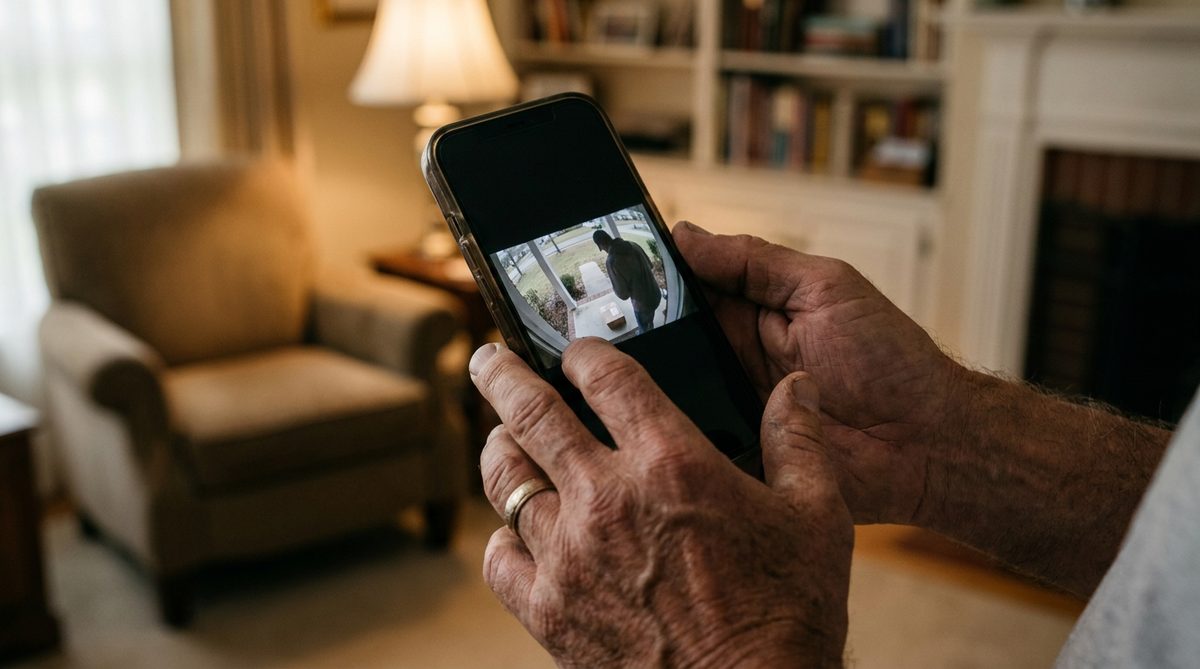
Smart speakers with screens (Echo Show 8, Nest Hub) are recommended first because they double as video-calling stations, medication reminder tools, and home control panels. Smart plugs that let you voice-control lamps and fans are a close second — they literally just plug into an existing outlet. And smart doorbells like the Ring Video Doorbell let you see and speak with anyone at your front door from your phone or your smart display, without ever getting up.
If you’re also thinking about broader changes to make your home safer and more livable long-term, take a look at How to Modify Your Home to Age in Place: A Step-by-Step Guide for a practical room-by-room approach.
Myth #2: “Age Tech Is Just a Fancy Medical Alert Necklace”
When many people hear “technology for aging in place,” they picture those old-school pendant buttons from 1990s TV commercials. That image is about 30 years behind reality.
Modern age tech spans an enormous range of categories. Smart water-leak sensors from brands like Flo and Moen can detect a pipe burst and automatically shut off your water main before you even notice a drip — preventing the kind of catastrophic flooding that displaces thousands of older homeowners every year. Smart smoke and CO detectors from Nest or First Alert send phone alerts to you and your emergency contacts simultaneously. Automatic stove shut-off devices like FireAvert cut power to a burner if your smoke alarm triggers, addressing the leading cause of home fires among adults over 65.
Then there’s the health-monitoring layer. The Apple Watch Series 10 and Samsung Galaxy Watch 7 now offer FDA-cleared electrocardiogram readings, fall detection with automatic 911 calling, blood oxygen monitoring, and irregular heart rhythm notifications. Consumer Reports rated the Apple Watch’s fall detection as “highly reliable” in its 2025 wearable testing, noting it correctly identified hard falls over 95% of the time while minimizing false alarms.
What “Age Tech” Actually Includes in 2026
Here’s a quick look at categories most people don’t realize fall under the age tech umbrella:
- Smart lighting: Motion-activated nightlights and voice-controlled overhead lights reduce fall risk, the number-one cause of injury-related death for Americans over 65 according to the CDC.
- Medication management: Automated pill dispensers like Hero and MedMinder lock medications and alert caregivers if a dose is missed.
- GPS trackers: Devices like Jiobit and Apple AirTag help families keep tabs on loved ones with early-stage dementia without being intrusive.
- Video doorbells and smart locks: These allow you to let in a home health aide or delivery driver remotely, without navigating stairs or rushing to the door.
- Robot vacuums with mapping: Less bending, less tripping over cords, cleaner floors — a genuinely practical upgrade.
The point is, age tech in 2026 is a whole ecosystem, not a single gadget around your neck.
Myth #3: “All This Connected Stuff Makes Me a Target for Hackers and Scammers”
The underlying concern here is legitimate. Older Americans lost an estimated $3.4 billion to online fraud in 2023, according to the FBI’s Internet Crime Complaint Center — an 11% jump from the prior year. So the instinct to be cautious is smart.
But here’s the myth-busting part: avoiding technology doesn’t protect you from scams. In fact, it can make you more vulnerable. Phone-based scams — the old-fashioned kind that come through your landline — remain the single most common fraud vector targeting adults over 60. Meanwhile, a properly configured smart home with a modern router and up-to-date firmware is actually a harder target for criminals than an unprotected Wi-Fi network with a factory-default password, which is what’s found in about half the homes examined for security.
The Cybersecurity & Infrastructure Security Agency (CISA) recommends a few straightforward steps that dramatically reduce your risk: enabling automatic software updates, using strong unique passwords (a password manager like 1Password or Bitwarden does this for you), and turning on two-factor authentication for email and banking. None of this requires a computer science degree.
For a much deeper look at the specific scam tactics circulating right now and exactly how to recognize them, see the companion piece: Seniors Losing Billions to Online Scams: A Tech Expert’s Guide.
The Security Setup Every Smart Home Needs
- Change your router’s default admin password. This is the single most neglected step. Your router is the front door to every device in your home. Log in (usually at 192.168.1.1 or via the manufacturer’s app), and change both the admin password and your Wi-Fi password to something long and unique.
- Enable automatic firmware updates on your router. Brands like Eero, Netgear Nighthawk, and TP-Link Deco push security patches automatically. If your router is more than five years old and doesn’t support auto-updates, it’s time to replace it.
- Turn on two-factor authentication (2FA) for every account that offers it. Start with your email, your bank, and your Amazon or Google account. This means even if someone steals your password, they still can’t get in without a code sent to your phone.
- Use a password manager. Bitwarden (free tier available) or 1Password ($36/year) are recommended options. They generate and store complex passwords so you never reuse the same one across sites — reuse being the number-one way accounts get compromised.
- Set up a separate “guest” Wi-Fi network for smart home devices. Most modern routers offer this. It isolates your smart plugs and cameras from the network your laptop and phone use for banking, adding an extra layer of protection.
Follow those five steps and you’ll be better secured than roughly 80% of American households, according to CISA’s own benchmarking data.

Myth #4: “I’d Have to Spend Thousands of Dollars to Make Any of This Work”
This misconception trips people up because the flashy magazine spreads always show whole-home smart renovations that cost five figures. The reality? You can build a genuinely useful age-tech setup for under $300.
Here’s what a practical starter kit looks like in mid-2026:
- Amazon Echo Show 8 (3rd Gen): ~$100. Video calling, voice reminders, smart home hub, weather, news, and music.
- Two smart plugs (TP-Link Kasa): ~$15. Voice-control a bedside lamp and a fan.
- One smart bulb with motion sensing (Philips Hue): ~$25. Bathroom nightlight that turns on automatically.
- Ring Video Doorbell (wired): ~$60. See who’s at the door without getting up.
- Water-leak sensor (YoLink): ~$20. Place it behind the toilet or under the kitchen sink.
Total: around $220 before tax. That’s less than a single plumber visit in most U.S. cities. And every one of these devices pays for itself in safety, convenience, or both.
Tom’s Guide regularly publishes updated pricing roundups and seasonal deal alerts for all of these categories, so timing a purchase around Prime Day (July) or Black Friday can shave another 20-40% off.
If you’re planning broader home modifications alongside technology upgrades, check out 5 Home Modifications for Aging in Place: Real Costs in 2025 to understand what the physical side of the equation looks like financially.
Myth #5: “Technology Isolates Older People — It’s Better to Just Stay Analog”
This is the myth that genuinely warrants concern, because it’s the one most likely to cause real harm. The data tells the exact opposite story.
A 2024 study published in the Journal of Medical Internet Research found that older adults who used video-calling technology at least twice a week reported 33% lower rates of self-described loneliness compared to those who relied solely on phone calls. The National Poll on Healthy Aging from the University of Michigan found that 72% of adults 50-80 said technology helped them stay connected to friends and family “a great deal” or “somewhat” during periods when in-person visits weren’t possible.
Technology isn’t a replacement for human connection — it’s a bridge to more of it. A grandmother who can FaceTime with her grandkids on a tablet after dinner isn’t choosing a screen over people. She’s choosing to see their faces instead of just hearing their voices. A retired veteran who joins a virtual book club through Zoom isn’t isolating — he’s expanding his social circle beyond what geography and mobility allow.
And the emerging world of virtual reality for older adults is showing particularly promising early results. Programs like Rendever, used in over 500 senior living communities, are taking residents on virtual tours of childhood neighborhoods, world landmarks, and even underwater coral reefs. Pilot research from MIT’s AgeLab suggests these experiences measurably reduce depression scores in participants.
The Real Isolation Risk
Here’s what the evidence actually shows causes isolation: limited mobility without tools to compensate. Difficulty hearing phone conversations without visual cues. Fear of going outside due to safety concerns. Every one of those problems has a technology-based partial solution — video calling, smart hearing aids that stream directly from phones, and medical alert wearables that provide confidence to move independently.
Staying connected is also a key component of overall well-being as we age. It fits squarely into the broader framework of 6 Pillars of a Healthier Age-Defying Lifestyle After 50, alongside physical activity, nutrition, and purpose.
Your 7-Step Action Plan to Start Using Age Tech Confidently
After tearing down myths, here’s something to build up. This is the exact sequence recommended for anyone over 50 who wants to start using age tech without feeling overwhelmed.
- Audit your daily friction points. Spend one week writing down moments that feel annoying, unsafe, or hard — getting up to check the door, fumbling for a light switch at night, missing a medication. These are your starting targets.
- Pick exactly one problem to solve first. Don’t try to wire your whole house. Solve the single most annoying or dangerous issue on your list. If it’s nighttime falls, start with a smart motion-activated light. If it’s front-door anxiety, start with a video doorbell.
- Buy the device and recruit a setup buddy. Ask a family member, neighbor, or friend to help with the 15-20 minute setup. Many Best Buy locations also offer free in-home setup consultations through their Totaltech membership.
- Use it for two full weeks before judging. Every new tool feels awkward at first. Give yourself 14 days of daily use before deciding if it’s helpful.
- Secure your network. Follow the five security steps outlined above. This protects every device you add going forward.
- Add one new device per month, max. This pace prevents overwhelm while steadily building a genuinely useful smart home over the course of a year.
- Bookmark two trusted review sources. Consumer Reports and Tom’s Guide are recommended for unbiased, regularly updated product recommendations. Avoid buying anything based solely on a social media ad or an unsolicited email.
The Bottom Line: Age Tech Works — But Only If You Let It
Over the past 12 years of covering consumer technology, age tech has gone from a niche afterthought to one of the fastest-growing and most genuinely useful categories in the industry. The devices are simpler than they’ve ever been. The prices are lower than they’ve ever been. And the evidence that they help people live independently, safely, and more socially connected is stronger than it’s ever been.
The only thing that hasn’t changed fast enough is the set of myths surrounding them. This piece aims to put a few of those to rest. You don’t need to be a tech expert. You don’t need to spend a fortune. And you certainly don’t need to be afraid. You just need to start with one problem, one device, and one small step.
Your independence is worth it.
Frequently Asked Questions
What is the best first age tech device for someone who has never used smart home technology?
A smart display like the Amazon Echo Show 8 or Google Nest Hub is the best starting point. It responds to voice commands, requires minimal technical skill after initial setup, and serves multiple purposes including video calling, medication reminders, weather updates, and controlling other smart devices you add later.
How much does a basic age tech setup cost to get started?
A practical starter kit including a smart display, a couple of smart plugs, a motion-sensing bulb, a video doorbell, and a water-leak sensor costs approximately $200 to $300 in mid-2026. Buying during sales events like Prime Day or Black Friday can reduce that by an additional 20 to 40 percent.
Are smart home devices safe from hackers if I'm over 60 and not very tech-savvy?
Yes, as long as you take a few basic steps. Change your router's default password, enable automatic firmware updates, turn on two-factor authentication for your important accounts, and use a password manager. These steps are straightforward and put you ahead of the vast majority of households in terms of cybersecurity.
Can age tech really help prevent falls at home?
Absolutely. Motion-activated smart lights illuminate pathways at night without requiring you to reach for a switch, which directly addresses the most common cause of nighttime falls. Smartwatches with fall detection can automatically call 911 if a hard fall is detected, and smart doorbells eliminate the need to rush to the front door.
Does using more technology make older adults more isolated or less isolated?
Research consistently shows it reduces isolation. A 2024 study in the Journal of Medical Internet Research found that older adults who video-called at least twice a week reported 33 percent lower loneliness rates than those who used only phone calls. Technology bridges distance and mobility limitations rather than replacing human connection.






2 Responses