

Key Takeaways
- Age tech devices like smart sensors, voice assistants, and medical alert wearables can dramatically extend independent living for older adults.
- Setting up a simple smart home system doesn't require technical expertise — most devices are plug-and-play and voice-controlled.
- The right technology can reduce fall risks, automate medication reminders, and keep families connected without sacrificing privacy.
- Investing in age tech now can save tens of thousands of dollars compared to assisted living or nursing home costs over time.
The Phone Call That Changed Everything
Last October, I got a call from my neighbor Linda — a retired school principal, sharp as ever at 74, fiercely independent, and living alone in the same three-bedroom colonial she’d owned for 38 years. She wasn’t calling about a tech review. She was calling because she’d fallen in her bathroom at 2 a.m. the previous Tuesday, lay on the tile for nearly four hours before she could reach her phone on the counter, and was now facing an ultimatum from her adult children: move into assisted living or accept a full-time caregiver.
Linda didn’t want either option. What she wanted was to stay in her home. And honestly, after covering consumer technology for more than 12 years, I knew she could — if she had the right tools.
Over the next six weeks, I helped Linda set up a modest collection of age tech devices. The total cost was under $600. Today, she’s still in her colonial, still hosting her book club on Thursdays, and her kids sleep better at night. Her story isn’t unusual. What’s unusual is how few people over 50 know that this technology exists, that it’s affordable, and that it genuinely works.
This article is the guide I wish Linda had found before that fall. It’s for anyone who wants to remain independent at home — and for the families who want to support that independence without hovering.
What Exactly Is “Age Tech” — and Why Does It Matter Now?
Age tech is an umbrella term for any technology designed to improve the quality of life for older adults. It spans everything from simple smartphone accessibility features to sophisticated AI-powered health monitoring systems. The sector has exploded: according to the AARP AgeTech Collaborative, investment in age tech surpassed $7 billion in 2024, and projections for 2026 indicate continued double-digit growth.
The reason is demographics. More than 10,000 Americans turn 65 every single day, a trend that will continue through 2030. The vast majority — roughly 77%, per AARP’s 2024 Home and Community Preferences Survey — want to age in their own homes. Yet the infrastructure to support that preference has historically been limited to grab bars and emergency pull cords.
That’s changed. The age tech devices available in 2025 are smarter, cheaper, and more intuitive than anything I reviewed even five years ago. And they address the four biggest barriers to aging in place: fall risk, medication management, social isolation, and home safety. If you’ve been exploring what it actually costs to stay home as you get older, our deep dive into aging in place costs breaks down the financial side in detail.
Smart Sensors: The Silent Guardians
How They Work
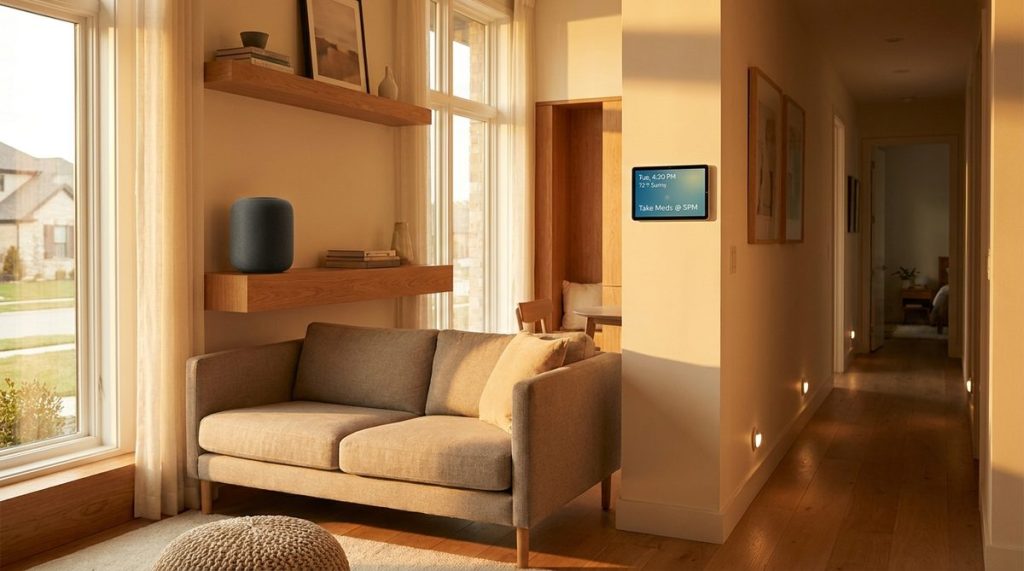
Smart sensors are small, unobtrusive devices placed around your home that detect motion, temperature, door openings, and even water leaks. They don’t record video. They don’t listen to your conversations. They simply notice patterns — and alert someone when those patterns break.
For Linda, I installed three motion sensors: one in the bathroom, one in the kitchen, and one at the front door. We connected them to a hub that sends a notification to her daughter’s phone if there’s no movement detected in the home for an unusual stretch of time. If Linda normally gets up by 8 a.m. and the kitchen sensor hasn’t triggered by 9:30, her daughter Sarah gets an alert.
What to Look For
- No-subscription options: Some systems like Samsung SmartThings sensors work with a one-time purchase. Others, like those from medical alert companies, charge $20–$50/month.
- Easy installation: Most modern sensors use adhesive backing. No drilling, no wiring, no electrician.
- Long battery life: Look for sensors with batteries that last 12–24 months. Replacing batteries every few weeks defeats the purpose.
- Family dashboard: The best systems let a trusted family member view activity summaries — not live feeds, just patterns — through an app.
Consumer Reports rated several of these systems in their 2025 smart home roundup, and I’d recommend starting there if you want unbiased testing data before you buy.
Voice Assistants: More Than a Novelty
I’ll be honest — when Amazon first released the Echo in 2014, I dismissed voice assistants as toys for early adopters. I was wrong. In my years covering this space, I’ve watched voice technology become one of the most impactful age tech devices for older adults, precisely because it removes the biggest barrier to technology adoption: the screen.
You don’t need to tap, swipe, pinch, or type. You talk. And for adults dealing with arthritis, low vision, or simply a reluctance to navigate tiny smartphone menus, that’s transformative.

Practical Uses That Actually Matter
- Medication reminders: “Alexa, remind me to take my blood pressure medication every day at 8 a.m. and 6 p.m.” It works. It’s free. And it doesn’t require downloading an app.
- Hands-free calling: Say “Hey Google, call my son David” and you’re connected. No fumbling for a phone, no unlocking a screen.
- Emergency contacts: Amazon’s Alexa now supports a feature where you can say “Alexa, call for help” and it contacts a pre-set list of emergency numbers.
- Smart home control: Connect your lights, thermostat, and door locks. Saying “Alexa, lock the front door” from bed beats walking downstairs at midnight.
- Entertainment and companionship: Music, audiobooks, trivia games, daily news briefings. For older adults living alone, a voice assistant can reduce the silence that often accelerates feelings of isolation.
Which One Should You Choose?
For most older adults, I recommend starting with an Amazon Echo Show (the version with a screen) or a Google Nest Hub. The screen adds video calling capability, visual weather forecasts, and photo slideshows. Both retail between $80 and $130. As Tom’s Guide noted in their 2025 comparison, the Echo Show 8 currently offers the best balance of screen size, sound quality, and smart home compatibility for the price.
One tip from personal experience: set up the device yourself or have a family member do it, then write down five to ten commands on a physical card and tape it near the device. Linda keeps a laminated index card next to her Echo that reads: “Alexa, what’s the weather?” / “Alexa, call Sarah.” / “Alexa, set a timer for 20 minutes.” She told me she used it 11 times on the first day.
Medical Alert Systems: Not Your Grandmother’s Life Alert
Yes, the “I’ve fallen and I can’t get up” commercials from the 1980s left an unfortunate stigma on medical alert devices. But the technology in 2025 bears almost no resemblance to those clunky pendants. Today’s medical alert wearables look like fitness trackers or simple watches, and they do far more than place emergency calls.
Features Worth Paying For
- Automatic fall detection: Modern accelerometers can detect a fall and automatically contact a monitoring center — even if you’re unconscious or can’t press a button. This is the feature Linda didn’t have the night she fell.
- GPS tracking: For adults who walk, drive, or garden outdoors, GPS-enabled devices work beyond the house. If something happens on your morning walk, help can find you.
- Two-way communication: You speak directly through the wearable. No need to reach a base station in another room.
- Caregiver app: Family members can check your device’s battery status, location, and whether an alert was triggered — all from their own phone.
Monthly monitoring costs typically range from $25 to $50. That’s a fraction of the $4,500–$5,000 monthly median cost of assisted living in the U.S. — a comparison that puts the investment in sharp perspective. For a broader look at how retirees are managing rising costs across the board, I’d suggest reading about the biggest financial concerns for retirees in 2026.
Smart Home Safety: Preventing Problems Before They Start
Falls get the headlines, but many of the emergencies that force older adults out of their homes are preventable household incidents: kitchen fires, carbon monoxide leaks, burst pipes, extreme indoor temperatures. Age tech devices can address all of them quietly and automatically.
Smart Stove Monitors
Cooking fires are the leading cause of home fires in the U.S., and adults over 65 have the highest fire death rate of any age group, according to the National Fire Protection Association. Smart stove monitors — like the FireAvert or iGuardStove — plug into your range’s outlet and automatically shut off the burner if a smoke alarm sounds or if the stove has been left on beyond a set time. They cost between $200 and $300 and require zero technical knowledge to install.
Smart Thermostats
Hypothermia and heat-related illness disproportionately affect older adults. A smart thermostat like the Google Nest or Ecobee maintains consistent temperatures and can alert a family member’s phone if the indoor temperature drops below 62°F or rises above 85°F. It’s a $130 investment that could prevent a hospital visit.
Smart Lighting
Motion-activated smart bulbs in hallways, bathrooms, and staircases eliminate the need to fumble for light switches at night — one of the simplest and most effective ways to reduce fall risk. A starter pack of Philips Hue motion-sensor bulbs runs about $50–$70.

Staying Connected: Tech That Fights Isolation
What I see most often in my reporting isn’t a technology problem — it’s a loneliness problem. The National Academies of Sciences, Engineering, and Medicine reported that social isolation significantly increases the risk of premature death, dementia, heart disease, and depression in older adults. Technology alone won’t replace human connection, but it can bridge distance in powerful ways.
Video Calling Made Simple
The Amazon Echo Show and Facebook Portal (now Meta Portal) were both designed with older adults in mind. Large screens, one-touch calling, and automatic camera framing that follows you as you move around the room make video calls feel natural rather than technical. Several of the adults I’ve helped set up these devices tell me they now video-call grandchildren multiple times a week — something they’d never done before because smartphones felt too fiddly.
Digital Photo Frames
Devices like the Aura Carver or Skylight Frame let family members send photos directly to a Wi-Fi-connected frame in your home. No action required on your end. New pictures of grandkids, vacations, or family events simply appear. It sounds small, but every person over 65 I’ve given one to has told me it’s their favorite piece of technology in the house.
Simplified Tablets
If a standard iPad feels overwhelming, consider the GrandPad — a tablet built specifically for older adults with large icons, a simplified interface, and a dedicated customer support line. It comes preloaded with family contacts, games, music, and video calling. Monthly plans run about $40–$50, which includes the device, LTE data, and tech support.
Protecting Yourself: Age Tech and Online Safety
Adding technology to your life means adding a layer of digital risk, and I wouldn’t be doing my job if I didn’t address this head-on. The FBI’s Internet Crime Complaint Center reported that Americans over 60 lost more than $3.4 billion to online fraud in 2023 — the highest losses of any age group. That number climbed again in 2024.
Here’s the good news: the same technology that keeps you independent can also keep you safe, if you set it up correctly.
- Enable two-factor authentication on every account — email, banking, Amazon, everything. This single step blocks the majority of unauthorized access attempts.
- Use a password manager like 1Password or Bitwarden. You remember one master password; the app handles the rest. No more sticky notes on the monitor.
- Turn on automatic updates for your phone, tablet, and smart home devices. Security patches fix vulnerabilities that scammers actively exploit.
- Set up bank alerts so you receive a text or email for every transaction above a threshold you choose — say, $50. Unauthorized charges get caught within minutes, not months.
For a comprehensive look at the scams specifically targeting retirees and how to build a defense, check out our guide on older adults losing billions to scams. And the FTC’s consumer advice site is a resource I recommend bookmarking — it publishes real-time scam alerts and step-by-step reporting instructions.
How to Get Started Without Getting Overwhelmed
In my 12 years of covering consumer technology, I’ve learned that the biggest enemy of adoption isn’t complexity — it’s overwhelm. People read articles like this one, see 15 different products, and do nothing because the list feels paralyzing. So let me simplify.
Start With One Problem
Ask yourself: what’s the one thing that worries me most about living alone (or that worries my family most)? Falls? Forgetting medication? Feeling isolated? A kitchen fire? Pick that one concern and buy the one device that addresses it. Live with it for a month. Then consider the next concern.
Budget Realistically
A basic but meaningful age tech setup — a voice assistant, a medical alert wearable, and a few smart sensors — costs roughly $300–$500 upfront plus $25–$50/month for monitoring. Compare that to the national median cost of a home health aide at $33/hour or assisted living at $54,000/year, and the math becomes very clear.
Ask for Help Setting Up — Then Own It
There’s no shame in having a family member, a tech-savvy friend, or even a local Geek Squad technician handle the initial setup. What matters is that you learn the daily basics: how to talk to your voice assistant, how to charge your wearable, how to answer a video call. The setup is a one-time event. The benefit is daily.
Linda’s Update — Six Months Later
I checked in with Linda last week. She told me her Echo Show is “the best thing anyone ever put in my kitchen,” that she hasn’t missed a dose of her cholesterol medication since we set up Alexa reminders, and that her daughter Sarah hasn’t called in a panic since the motion sensors went live. She did admit that her smart stove monitor shut off her burner once while she was slow-roasting a brisket — “a small price to pay,” she said, laughing.
She also told me something I think about often. She said, “I didn’t want technology because I thought it would make me feel old. But it’s done the opposite. I feel like I’m in charge again.”
That’s the point. Age tech devices aren’t about replacing your independence. They’re about reinforcing it — quietly, affordably, and on your terms. The technology is ready. The question is whether you are. And from everything I’ve seen, if you’re reading this article, you already are.
Frequently Asked Questions
What are the best age tech devices for seniors who want to age in place?
The most impactful age tech devices include voice assistants like Amazon Echo Show for hands-free calling and reminders, medical alert wearables with automatic fall detection, smart motion sensors that alert family members to unusual activity, and smart stove monitors that prevent kitchen fires. Starting with one device that addresses your biggest concern is the most effective approach.
How much do age tech devices cost for a basic home setup?
A practical starter setup — including a voice assistant ($80–$130), a medical alert wearable ($50–$100 for the device plus $25–$50/month monitoring), and a few smart sensors ($30–$60 total) — typically costs $300–$500 upfront. This is a fraction of the $4,500–$5,000 monthly median cost of assisted living, making it one of the most cost-effective ways to extend independent living.
Are age tech devices difficult for non-technical seniors to use?
Most modern age tech devices are designed with simplicity in mind. Voice assistants require only spoken commands, medical alert wearables work with a single button press or automatically detect falls, and smart sensors operate passively with no daily interaction needed. The initial setup may require help from a family member or technician, but everyday use is straightforward and requires no technical expertise.
About Alex Rivera, 12+ Years in Consumer Tech Reporting
Alex Rivera is a senior technology journalist with over 12 years of experience making technology accessible to everyday readers. He has covered consumer electronics, smartphones, smart home devices, streaming platforms, and digital privacy for major publications. At Daily Trends Now, Alex focuses on the tech that matters most to American adults — from choosing the right phone plan to protecting your data online. His reviews and guides cut through the jargon to help readers make confident technology decisions.